FortiGate in Factory Reset: Understanding TCP and UDP Ports in FortiOSNetwork Security / Fortinet


About
FortiGate in Factory Reset: Understanding TCP and UDP Ports in FortiOS
When a FortiGate is in factory-default state, FortiOS can provide a range of TCP and UDP ports to support management, updates, registration, logging, VPN, high availability, and integration with other Fortinet products. However, the most important takeaway is this: many of these ports are not active, visible, or relevant by default. They typically only appear when the corresponding feature is actually being used.
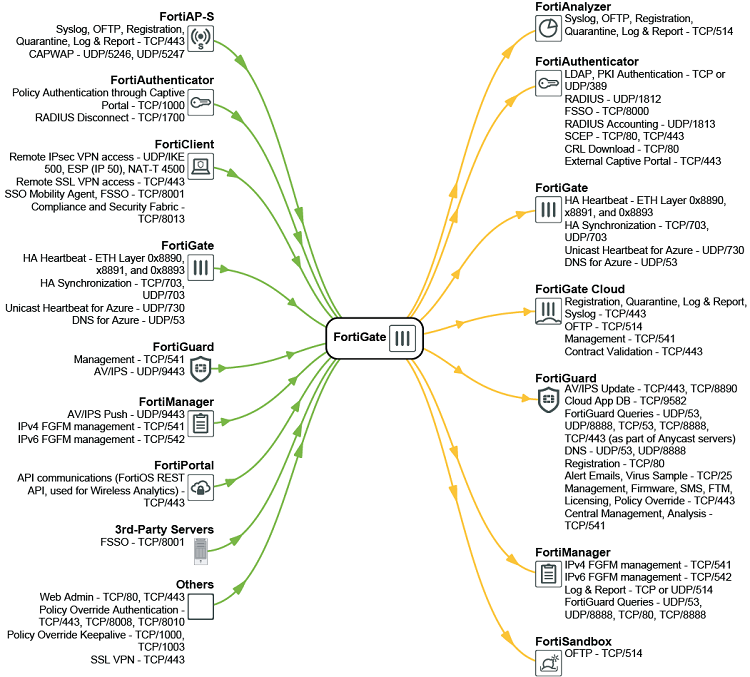
This distinction matters. The diagram is best understood not as a static list of permanently open ports, but as a functional communication map that shows which protocols FortiOS may use depending on the enabled services and deployment design.
Key point: The TCP and UDP ports shown in the overview are not necessarily exposed by default. Many of them only become visible or relevant when the associated FortiOS function is configured and actively used.
Why This Matters
During initial deployment, staging, troubleshooting, proof-of-concept testing, or after a factory reset, it is important to understand which communications a FortiGate may require. Without that visibility, teams often run into issues such as:
- failed device registration,
- missing FortiGuard updates,
- FortiManager or FortiAnalyzer connectivity problems,
- VPN setup failures,
- HA synchronization issues,
- authentication or FSSO malfunctions,
- or firewall rules that are too restrictive for intended features.
At the same time, security teams should avoid jumping to the conclusion that every documented port equals a permanent attack surface. In many cases, the communication is feature-driven, outbound, or only used internally between Fortinet components.
What the Diagram Shows
The provided image places FortiGate at the center and maps communications to surrounding systems and services. On the left-hand side, the diagram highlights interactions with components such as FortiAP-S, FortiAuthenticator, FortiClient, FortiGuard, FortiManager, FortiPortal, third-party servers, and general management functions. On the right-hand side, the diagram adds integrations including FortiAnalyzer, FortiToken, FortiGate Cloud, FortiCloud, FortiManager, and FortiSandbox.
Examples visible in the image
- Web administration: TCP/80, TCP/443
- Remote IPsec VPN: UDP/500, UDP/4500, ESP (IP 50)
- Remote SSL VPN: TCP/443
- HA synchronization: TCP/703, UDP/703, special HA EtherTypes 0x8890, 0x8891, 0x8893
- FortiGuard: TCP/541, UDP/9443
- FortiManager: TCP/541, TCP/542, TCP/443
- FSSO / identity-related functions: TCP/8000, TCP/8001, UDP/1812, UDP/1813, TCP/1700, TCP/443
The Most Important Principle: Feature-Dependent Port Usage
One of the biggest misconceptions in firewall reviews is to assume that every port listed in a vendor communication matrix is always open and listening. That is not an accurate reading of this FortiGate overview.
Instead, the image illustrates the broader set of communications FortiOS may use under certain conditions:
- Some ports are only used when a specific feature is configured.
- Some communications are outbound rather than inbound.
- Some are only relevant in clustered, cloud, or centrally managed deployments.
- Some exist solely for integration with other Fortinet components.
That makes the diagram especially useful for planning and troubleshooting, but potentially misleading if interpreted as a simple list of permanently active listeners.
Key Communication Areas
1. Management and Administrative Access
Basic management functions commonly rely on TCP/80 and TCP/443. These ports may be used for web administration, API access, portal-related features, policy override functions, and SSL-based management workflows.
In practice, TCP/443 appears repeatedly across the diagram because it is used for multiple FortiOS capabilities beyond the GUI alone.
2. VPN Services
As soon as remote connectivity is enabled, traditional VPN-related protocols become relevant:
- IKE: UDP/500
- NAT Traversal: UDP/4500
- ESP: IP protocol 50
- SSL VPN: TCP/443
A factory-default FortiGate is capable of supporting these functions, but the ports only matter operationally once the corresponding VPN services are configured and used.
3. High Availability and Cluster Communication
The image also references HA-related connectivity, including specialized HA heartbeat EtherTypes (0x8890, 0x8891, 0x8893) as well as TCP/703 and UDP/703. For Azure scenarios, the diagram additionally shows UDP/730 for unicast heartbeat and UDP/53 for DNS.
This is a strong reminder that HA deployments require more than just basic management access. Cloud-specific HA designs may also introduce additional dependencies.
4. FortiGuard, Licensing, and Security Services
FortiGate systems can interact with a broad set of FortiGuard and cloud-backed services. The image includes examples such as TCP/541, UDP/9443, UDP/53, UDP/8888, TCP/53, TCP/8888, TCP/443, TCP/80, TCP/25, TCP/9582, and TCP/8890.
Depending on enabled services, these may support antivirus and IPS updates, cloud app database access, licensing, firmware workflows, central analysis, mail services, quarantine actions, contract validation, and virus sample uploads.
5. Logging, Reporting, and Cloud Integration
The diagram shows communication paths to FortiAnalyzer, FortiGate Cloud, FortiClient Cloud, and FortiSandbox. Ports such as TCP/514, TCP/443, and TCP/541 appear in this context, depending on the service being used.
This highlights another architectural point: even a reset device is designed to fit into a larger ecosystem of monitoring, reporting, management, and cloud-assisted security services.
6. Identity, Authentication, and FSSO
Authentication-related integrations significantly expand the communication matrix. The image includes the following examples:
- LDAP: TCP/UDP 389
- RADIUS: UDP/1812
- RADIUS Accounting: UDP/1813
- RADIUS Disconnect: TCP/1700
- FSSO: TCP/8000, TCP/8001
- Captive Portal: TCP/443
- Policy Authentication / Override: TCP/1000, TCP/8008, TCP/8010, TCP/1003
- Compliance and Security Fabric: TCP/8013
These ports become relevant only when FortiGate is integrated with identity providers, endpoint compliance checks, SSO frameworks, or captive portal workflows.
What This Means for New Deployments
For new FortiGate deployments, the image communicates four practical lessons:
- Factory default does not mean “only a few standard ports.” FortiOS is already prepared for a broad range of features and integrations.
- Port lists must be interpreted in context. The real relevance of a port depends on the feature set in use.
- Network segmentation and egress filtering require planning. Restrictive rules can quickly break registration, updates, HA, logging, or centralized management.
- Scans and audits should be interpreted carefully. Documented communication paths are not the same as permanently listening services.
Best Practices
- Enable only the functions you actually need.
- Define port access based on real feature usage, not on generic assumptions.
- Restrict management access as tightly as possible.
- Document outbound requirements for FortiGuard, registration, updates, and cloud services.
- Consider VPN, HA, and authentication dependencies early in the design phase.
- Review communication matrices as operational design references, not as a raw list of exposed services.
Conclusion
A FortiGate in factory-reset state is not simply a box with a few administrative ports. It is a platform built to support a wide range of security, management, cloud, logging, authentication, and high-availability functions. The communication overview in the image is therefore best understood as a map of potential FortiOS interactions.
The key conclusion is straightforward:
Many of the TCP and UDP ports shown are not visible or active by default. They typically become relevant only when the corresponding function is enabled and used.